


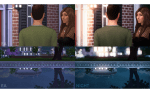
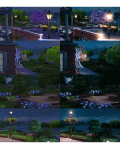
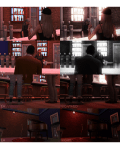
👻 DOWNLOAD: SIMFILESHARE
- Requires ReShade 3.0
- Designed specifically for TS4 gameplay screenshots, but will probably work for TS3 as well
👻 INFORMATION
- DOWNLOAD OPTIONS
- DRAMA: This works best in daylight and other well-lit environments. This can also be used to brighten dark scenes.
- DRAMA_NIGHT: This works best at night or in dark environments with minimal light sources. I recommend using grain and bloom. You may teed to tweak bloom if the light source in your scene is too bright.
- TOGGLE HOTKEYS
SHIFT + 1
—
Ambient Lighting
SHIFT + 2
—
Depth of Field
SHIFT + 3
—
Tilt-Shift
F
—
Gradient Desaturation
G
—
Grain
H
—
Chromatic Aberration (3D)
B
—
Black & White
- N
—
Bloom
- RECOMMENDATIONS
- I personally think Night, Gradient Desaturation, and Black & White modes look best with grain.
- When Depth of Field is on, use your mouse to adjust the depth.
- I recommend using @buckleysims Tab Mode Camera Mod for better screenshots.
👻 INSTALLATION HELP
- Place the .ini files in your The Sims 4 > Game > Bin folder
- ex.: C:Program Files (x86)Origin GamesThe Sims 4GameBin
- Run your game
- Turn off edge-smoothing and post-processing effects in options
- Press ‘SHIFT + F2′ to open the ReShade menu
- Select the preset from the drop-down menu
- Take screenshots using ‘Print Screen’
👻 CREDIT

 simmingpenguin