

🌹 NOSTALGIA:
a preset for reshade 3.0, named for the toggleable (is that a word?) sepia filter that reminded me of old photos and my beloved story flashbacks.
toggle keys:
- sepia – 4
- marty mcfly DOF – 5
- matso DOF – 6
- GP65CJ042 – 7
- reshade – 8 (this is my own personal one, idk if it actually transfers over)
- MXAO (shadows) – 9
- bloom – B
- ambient light – J
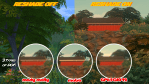
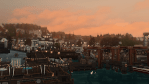
obviously you can edit the toggles, turn certain things off (the sepia is especially an important one just because it can sometimes be a bit too orangey. for reference, the first pic has sepia off and the last pic has sepia on)
this is NOT a preset for playing. keeping reshade on for too long might crash your game. i only turn it on for screenshots.
reminders:
- this file goes in: C:Program Files (x86)Origin GamesThe Sims 4GameBin
- to use DOF, edge smoothing and post processing must be turned off
- DOF is mouse controlled; the area around your cursor will be in focus. when taking picture in tab mode, click and adjust the focus to your liking
- how to install reshade (no questions will be answered regarding this)
DOWNLOAD 🌹

 simmingpenguin