a-radioactive-mess:

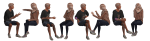
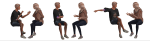
arguing [in-game&CAS poses] // POSE REQUEST 4/10

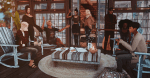
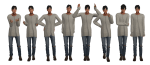
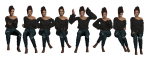
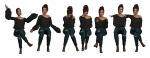
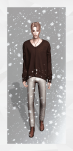
ummm so this is exactly what the name says, arguing poses. there are 15 in total, but i made them available in 3 different versions. Standing, sitting and sitting next to each other (and for this last one, the teleporters have to be in the same spot). it’s separated in 3 packages, one for the cas poses, one for the single poses (standing and sitting) and one for the facing each other poses.

i was feeling super lazy to make the preview so there’s only one pic for it ajvnaljvnfal but like usual click on pics for a better view. enjoy!! X)

– 15 in-game poses (in 3 versions) + 15 cas poses [evil trait] –

through here for all my s4 downloads

tag me if you use!

download [unzip file and drop in mods foler]

––– links not working? try right-clicking and opening in a new tab!

thanks to all cc creators!

~ and have fun ~

{•̴͈ ˔̇ •̴͈}

peacemaker-ic:

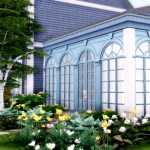
Romantic Garden Expanded – 16 New Doors and Windows


I love the Romantic Garden Sp especially the window, but there was only ever one of them. That really limited its use so I had to go about fixing that. This set took a while to complete; as much as I love the window, it wasn’t exactly easy to manipulate. However this addon is done and I now have a very usable set of objects that are great for grand entries, sun-rooms and greenhouses among other things. No longer is one of the best windows to come out of an SP limited by its uniqueness.

Keep reading

peanutbutterjelly2002:

image

SKILL CERTIFICATE in one EA wood texture

An edit of the Doctor of Medicine Diploma from Sims 4 Get to Work. I made these because I was fascinated by the skill certificates from the Sims 3, I accidentally saw an image of it on google and I wanted it in the Sims 4.

image
image

These are all the swatches of the Skill Certificate and as you can see it only has one wood texture for all. (I’m planning to do more wood colors.) You can find it in the Wall Decoration or you can simply search it using Skill Certificate.

Thank you @sims4studioofficial for the program and for the tutorials.

  • Please Do Not Steal!
  • Please Do Not upload it to SimsDom.
  • Can be put in the inventory 
  • Can be dragged in Live Mode
  • 48 Swatches for 48 Skills (hidden skills included)
  • Different icon for each skill
  • Get To Work required 
  • please notify me if it doesn’t work. Thank You!

Download: SFS (no adfly)

Hello! How do you install the lighting mod?

pixeltrashcan:

Hi. Go to your program files, find ts4- in those file you want the folders, data and delta. 

Click on data, then shared. You’ll see a folder called worlds, all the files in there need to be replace with the ones from my download.. In my download you wanna take the files from the one titled base game, copy and replace. 

It’s the same thing for delta, except all of those are broken down per expansion and game pack. To replace them find the corresponding folder and copy and past. 

I really hope this helps, I’m shit at explaining things, but if you have more question feel free to shoot me a DM.

templatepsds:

。・ template psd sixty five, template pack thirty by templatepsds ゜+.*

-`. info .’-

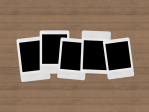
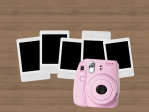
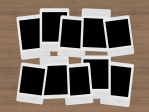
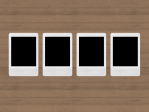
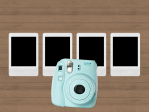
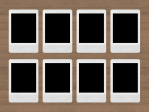
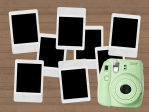
+ as requested, here are some Instax Polaroid templates.

+ there are 5 different templates. the first one is of 5 polaroids with the optional camera if you want it; the second one is of 10 polaroids with no camera option (although feel free to add one if you want); the third is of 4 neatly arranged polaroids with the optional camera; the fourth if of 8 neatly arranged polaroids; the fifth is of 8 unorganized polaroids with the optional camera.

+ if you want to use the polaroid camera and change the color, use the hue/saturation adjustment provided and change the hue to the color you want.

+ to put an image in one of the polaroids, place your image layer right above one of the layers titled “put image in here”, right-click on your image, and select “Create Clipping Mask.” repeat the process for more.

+ you can change the background if you want.

+ not for commercial use or anything like that! just for personal use/to have fun.

+ adjust as much as you want to suit your liking.

+ please like or reblog if you download.

+ message if you have any questions/difficulties!

-`. dl .’-

+ one 

+ two

+ three

+ four

+ five